~/projects $ cd gruber-darker-theme
Gruber Darker Theme
VS Code theme port of the classic Emacs theme
TypeScript · MITmarketplacecode
$ tree (4 sections)
What it is
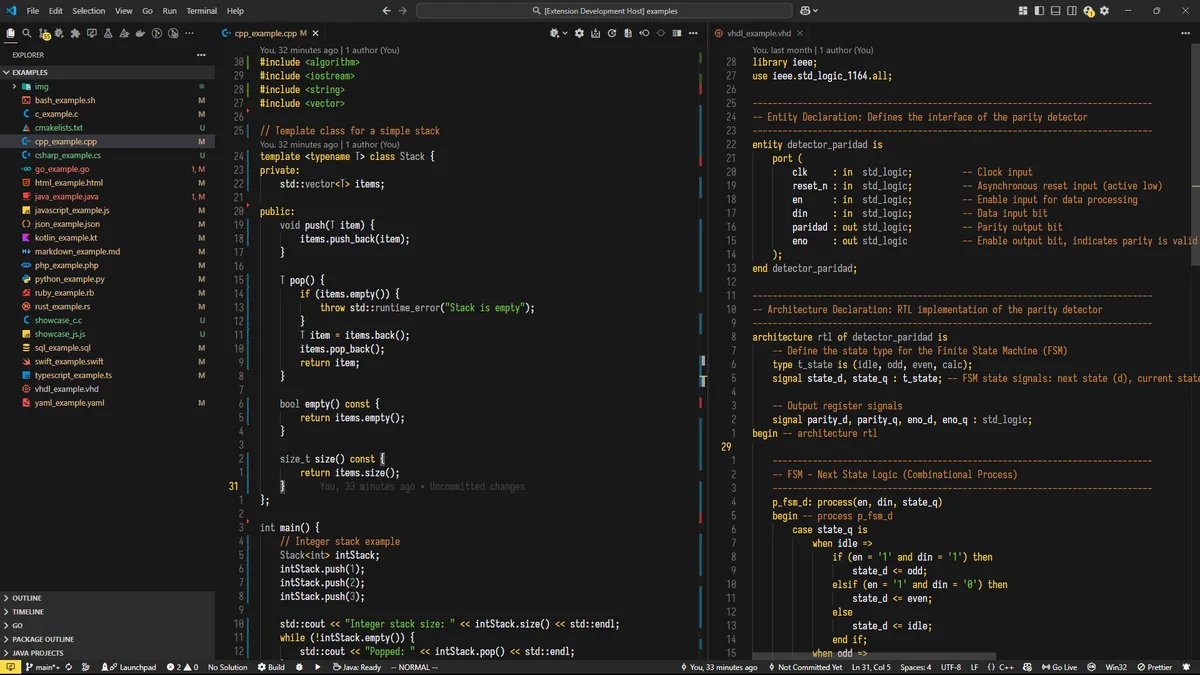
A VS Code port of the classic Gruber Darker look, based on JoaoAJMatos's adaptation and tuned for readability and high contrast. This site uses the same palette.
Palette
- background
#181818 - foreground
#f4f4ff - selection
#484848 - yellow
#ffdd33 - string green
#73c936 - constant green
#95a99f - lilac
#9e95c7 - blue
#96a6c8 - orange
#cc8c3c - red
#f43841 - gray
#7a7076 - dark gray
#52494e
Install
Search for Gruber Darker Theme in the Extensions view (Ctrl+Shift+X), install it, then run Preferences: Color Theme and pick Tsoding Gruber Darker.
These settings match the screenshots:
{
  "editor.bracketPairColorization.enabled": false,
  "editor.renderLineHighlight": "none",
  "workbench.activityBar.location": "top"
}
Credits
- John Gruber designed the original Gruber Dark theme for BBEdit.
- Jason Blevins wrote the Emacs version of Gruber Darker.
- Alexey Kutepov (rexim) adapted and extended it for modern Emacs.
- JoaoAJMatos made the VS Code adaptation this port is based on.